What is an eSIM?
An eSIM is a digital SIM card built directly into your smartphone, tablet, or smartwatch. Unlike a traditional plastic SIM card that you insert into a tray, an eSIM is a programmable chip soldered to your device's motherboard. You activate it by downloading a carrier profile over the internet, no physical card required.
The technology has been around since 2016, but widespread adoption started when Apple launched eSIM support on the iPhone XS in 2018. Today, most flagship phones from Apple, Samsung, Google, and other manufacturers include eSIM capability alongside or instead of a physical SIM slot.
How does an eSIM work?
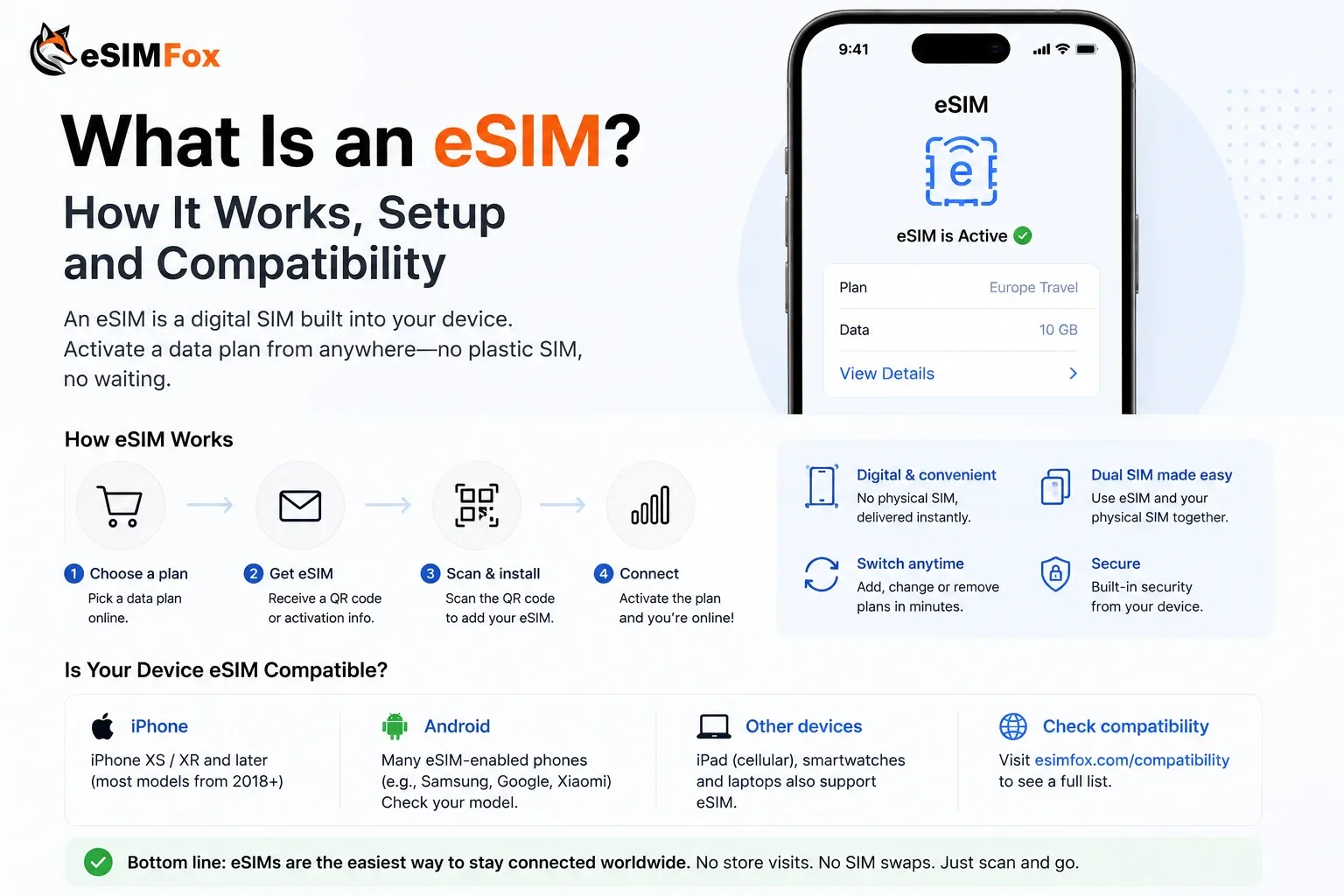
An eSIM works by storing carrier credentials digitally instead of on a removable plastic card. When you purchase an eSIM plan, the provider sends you a QR code or an activation link. You scan the code or tap the link, and your phone downloads the carrier profile directly to the eSIM chip. The profile contains the network authentication data your phone needs to connect to that carrier's towers. The mechanism behind this over-the-air delivery is remote SIM provisioning.
Once installed, the eSIM functions exactly like a physical SIM. Your phone uses it to make calls, send texts, and access mobile data. The difference is that you can store multiple eSIM profiles on one device and switch between them in your phone's settings without physically swapping cards. The chip that makes this possible is called an eUICC.
Most modern phones support dual SIM setups, meaning you can keep your home carrier active on a physical SIM while using a travel eSIM for data abroad. This setup lets you receive calls and texts on your regular number while avoiding expensive roaming charges.
Why eSIM matters for travelers
For international travelers, eSIM solves the connectivity problem without the friction of hunting for a local SIM card at the airport. You buy a data plan before you leave, install it at home, and land with working internet. No queue at the airport kiosk, no passport photocopy, no risk of losing your physical SIM card.
The practical benefits stack up quickly. You keep your home number active for two-factor authentication and important calls. You avoid surprise roaming bills. You can compare plan prices online instead of accepting whatever the airport counter offers. And if you run out of data mid-trip, you top up from your hotel room instead of searching for a carrier store.
Travel eSIM providers like eSIMFOX specialize in short-term data plans designed for tourists. You pick a country or region, choose a data amount that fits your trip length, and install the plan in under a minute. The entire process happens through your phone's camera and settings app.
How to install an eSIM
Installing an eSIM is usually quick once you have the QR code or activation link from your provider. The exact steps vary slightly by device, but the general flow is the same across iPhone, Android, and other eSIM-compatible phones. Our step-by-step eSIM installation guide walks through it for each device.
Step 1: Check device compatibility — Confirm your phone supports eSIM. Most iPhones from XS onward, Samsung Galaxy phones from S20 onward, and Google Pixel phones from Pixel 3 onward include eSIM. Check your device settings or use an online compatibility checker if you're unsure.
Step 2: Purchase an eSIM plan — Buy a plan from a travel eSIM provider. You'll receive a QR code by email or in the provider's app. Some providers also offer manual activation using an SM-DP+ address and activation code, but QR code installation is faster and simpler.
Step 3: Scan the QR code — On iPhone, go to Settings > Cellular > Add eSIM and scan the QR code. On Android, go to Settings > Network & Internet > SIMs > Add SIM and scan the code. Your phone downloads the carrier profile and adds it to your available SIM list.
Step 4: Label and activate the eSIM — Give the eSIM a recognizable label like "Travel Data" or the country name. Choose whether to use it for mobile data, calls, or both. Most travelers set the eSIM for data only and keep their home SIM active for calls and texts.
Step 5: Enable data roaming — Turn on data roaming for the eSIM line. This setting is required for travel eSIMs to connect to local networks. Your home SIM's roaming can stay off to avoid accidental charges.
Once activated, the eSIM connects automatically when you arrive in the destination country. You'll see the carrier name in your status bar, and mobile data works immediately. If the eSIM doesn't connect, restart your phone or manually select a network in your cellular settings.
Common eSIM misconceptions
Several myths about eSIM persist, especially among first-time users. Clearing these up helps travelers make confident decisions about whether eSIM fits their needs.
Myth: eSIM is only for new phones. Reality: eSIM support started in 2018, so any iPhone XS or newer, Samsung Galaxy S20 or newer, and Google Pixel 3 or newer includes it. That covers most phones purchased in the last five years.
Myth: You lose your home number when you install an eSIM. Reality: Dual SIM setups let you keep your home carrier active on a physical SIM while using a travel eSIM for data. You receive calls and texts on your regular number without roaming charges.
Myth: eSIM is harder to set up than a physical SIM. Reality: Scanning a QR code and tapping a few settings takes less time than finding a SIM ejector tool, swapping cards, and keeping track of the old SIM. eSIM setup is faster and less fiddly.
Myth: eSIM plans are more expensive than local SIM cards. Reality: Prices vary by provider and destination, but competitive travel eSIM providers often match or beat airport SIM card pricing. The convenience of installing before you travel and avoiding airport queues adds value even when the price is similar.
Myth: eSIM doesn't work in rural areas. Reality: eSIM coverage depends on the carrier network your provider partners with, not the eSIM technology itself. If the local carrier has towers in a rural area, your eSIM will work there just like a physical SIM from the same carrier.
eSIM vs physical SIM card
The core difference between eSIM and physical SIM is the form factor. A physical SIM is a removable plastic card; an eSIM is a chip soldered to your phone's motherboard. Both store the same carrier credentials and connect to the same networks, but the installation and management workflows differ.
eSIM vs physical SIM comparison
Key differences between eSIM and traditional physical SIM cards
| Feature | eSIM | Physical SIM |
|---|---|---|
| Installation | Scan QR code, activate in settings | Insert card into SIM tray |
| Setup time | Under 1 minute | 2–5 minutes (finding tool, swapping card) |
| Switching carriers | Download new profile, switch in settings | Remove old card, insert new card |
| Dual SIM support | Store multiple profiles, switch instantly | Requires dual SIM tray or second device |
| Risk of loss | Cannot be lost or damaged | Can be lost, damaged, or misplaced |
| Availability | Buy online, install before travel | Buy at airport, carrier store, or kiosk |
For travelers, the eSIM advantage is convenience. You research plans at home, compare prices across providers, and arrive with working data. Physical SIM cards require finding a store or kiosk, often at the airport when you're tired and in a hurry. The price difference is usually small, but the time and stress savings favor eSIM.
Which devices support eSIM?
eSIM support is now standard on most flagship smartphones, but not every device includes it. The easiest way to check is to look in your phone's settings for an option to add a cellular plan or eSIM. If the option exists, your device is compatible. You can also look your model up in our eSIM compatible devices list.
iPhones: iPhone XS, XR, 11, 12, 13, 14, 15, and SE (2020 and later) all support eSIM. The iPhone 14 and 15 models sold in the United States are eSIM-only and have no physical SIM tray.
Samsung Galaxy: Galaxy S20, S21, S22, S23, S24, and their Plus and Ultra variants support eSIM. The Galaxy Z Fold and Z Flip series from 2020 onward also include eSIM.
Google Pixel: Pixel 3, 4, 5, 6, 7, 8, and their XL or Pro variants support eSIM. The Pixel Fold also includes eSIM capability.
Other brands: Many recent models from Motorola, Oppo, Huawei, and other manufacturers include eSIM, but support varies by region and carrier. Check your device manual or use an online compatibility checker to confirm.
Tablets and smartwatches also support eSIM. The iPad Pro, iPad Air, and iPad Mini cellular models from 2018 onward include eSIM. The Apple Watch Series 3 and later, Samsung Galaxy Watch 4 and later, and some Wear OS watches support eSIM for standalone cellular connectivity.
Use the eSIMFOX compatibility checker to confirm your phone, tablet, or smartwatch works with eSIM. Enter your device model and get an instant yes or no answer.
When to use eSIM instead of a physical SIM
eSIM makes the most sense when convenience, speed, and dual SIM capability matter more than absolute rock-bottom pricing. Travelers who value arriving with working data, keeping their home number active, and avoiding airport SIM card queues benefit most from eSIM.
Physical SIM cards still have a place. If your phone doesn't support eSIM, a physical SIM is your only option. If you're traveling to a country where eSIM providers don't offer competitive plans, a local SIM from a carrier store might be cheaper. And if you prefer face-to-face support or need a plan that includes local calling minutes, a physical SIM from a local carrier can be the better choice.
For most short-term international trips, eSIM wins on convenience. You research plans at home, install before you leave, and land with working internet. The price difference between eSIM and airport SIM cards is usually small, and the time saved avoiding queues and paperwork tips the balance toward eSIM. If you are unsure what size plan to buy, see how much data you need for travel in Europe.
Related eSIM concepts
Understanding eSIM opens the door to related technologies and services that make international connectivity easier. These concepts build on the eSIM foundation and help you get the most out of digital SIM technology.
- Dual SIM: The ability to use two phone numbers on one device, either with two physical SIMs, one physical and one eSIM, or two eSIMs. Travelers use dual SIM to keep their home number active while using a travel eSIM for data.
- QR code activation: The most common way to install an eSIM. You scan a QR code provided by your carrier or eSIM provider, and your phone downloads the carrier profile automatically.
- SM-DP+ address: An alternative activation method that uses a server address and activation code instead of a QR code. Useful when you can't scan a code or need to install an eSIM on a device without a camera. See our SM-DP+ address and manual installation guide.
- Data roaming: A setting that allows your phone to connect to networks outside your home carrier's coverage area. Travel eSIMs require data roaming to be turned on, but your home SIM's roaming can stay off to avoid charges.
- Regional eSIM plans: Data plans that cover multiple countries in one region, such as Europe or Southeast Asia. Regional plans are convenient for multi-country trips and often cost less than buying separate plans for each destination.
Each of these concepts connects to the core eSIM technology and helps you make better decisions about which plan to buy, how to install it, and how to manage connectivity across multiple countries. If your eSIM is installed but you still have no connection, our eSIM troubleshooting guide walks through the usual causes.
Frequently asked questions
Get started with eSIM
eSIM technology removes the friction from international connectivity. You buy a plan online, install it at home, and land with working data. No airport queue, no passport photocopy, no risk of losing a physical SIM card.
If your phone supports eSIM and you're planning international travel, a travel eSIM plan is the simplest way to stay connected. Compare providers, check coverage for your destination, and install the plan before you leave. The entire process takes less time than finding a SIM card at the airport.
eSIMFOX offers data plans for over 150 countries. Pick your destination, choose a data amount, and install your eSIM before you travel. Plans are prepaid, so you see the price and data allowance before you buy.
Frequently Asked Questions
What is an eSIM?
How does an eSIM work?
Why does eSIM matter for travelers?
Is an eSIM the same as a physical SIM?
Where do I use an eSIM?
Can I use eSIM and a physical SIM at the same time?
Stay connected on your next trip
Browse eSIM plans for 200+ destinations and activate in 60 seconds.