




No roaming charges
Roaming charges can add up quickly. Get a prepaid data plan for Ecuador & stay in control of your phone bill.




Mobile data in Ecuador from €3.99 with Movistar & Claro. Install your eSIM digitally and keep your WhatsApp number.From €3.99 on Movistar & Claro. Ready to connect – no contract.
Validity starts with the first network connection in Ecuador, not when you buy.
Not seeing the right plan?
Let us know — our 24/7 WhatsApp experts will help.
Prepaid eSIM (digital)
4G / 5G where available
QR code or manual setup
iPhone, Samsung, Pixel & other eSIM-capable devices
Data only
No new eSIM required
Instant via email & dashboard
No additional roaming charges
On the first network connection in Ecuador
Not Required
24/7 via WhatsApp
Your eSIM connects automatically to the strongest available partner network – the same masts the locals use.


3 networks independently tested nationwide·Source: nPerf 2026 barometer (PDF, opens in a new tab)
Always the best available signal, with no manual switching.
Fast mobile internet wherever the network supports it.
A stable connection in cities and the most-visited regions.
Actual speed and coverage depend on location, device and network load.
Ready in minutes — no physical SIM card needed.
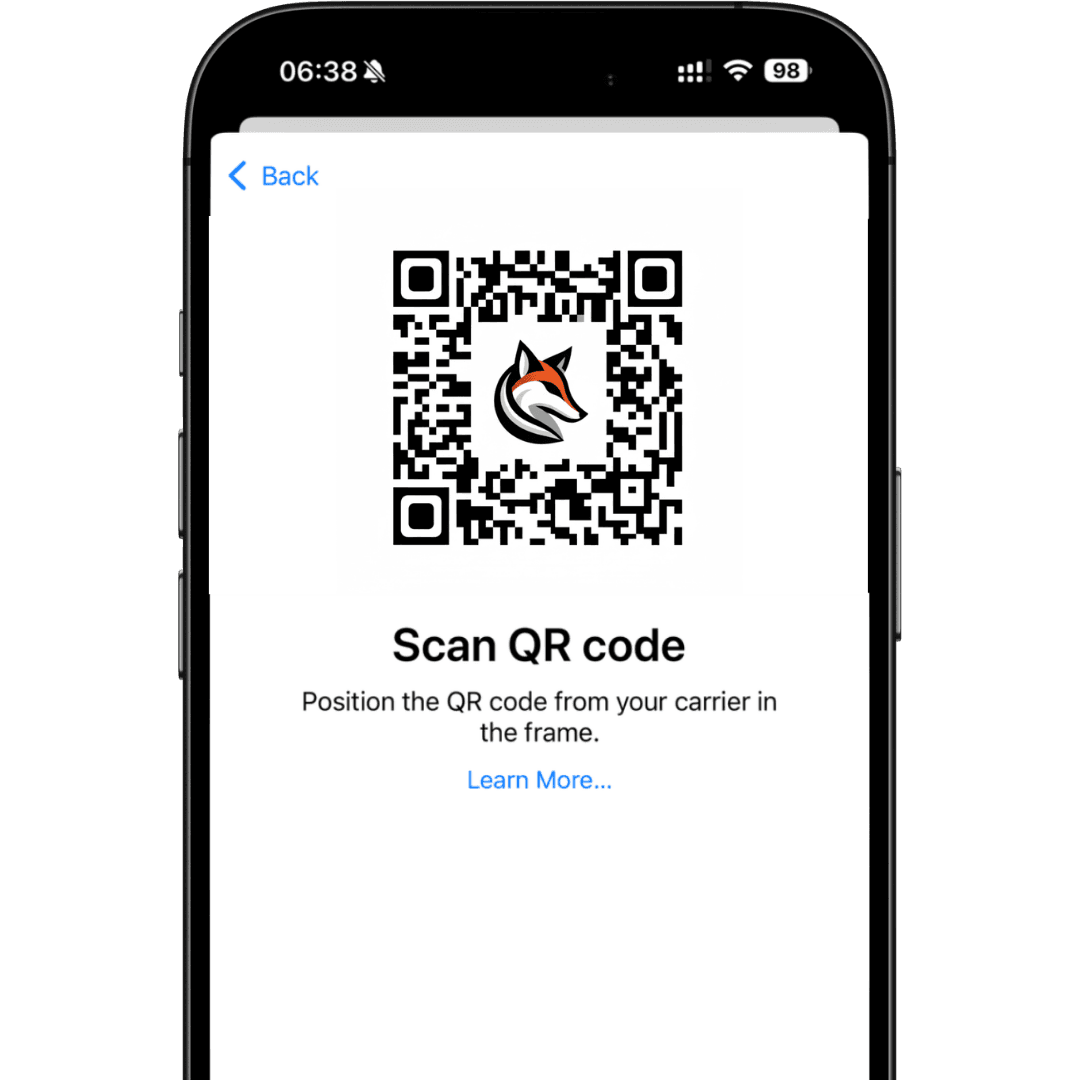
QR code instantly by email
Scan the QR code at home over Wi‑Fi
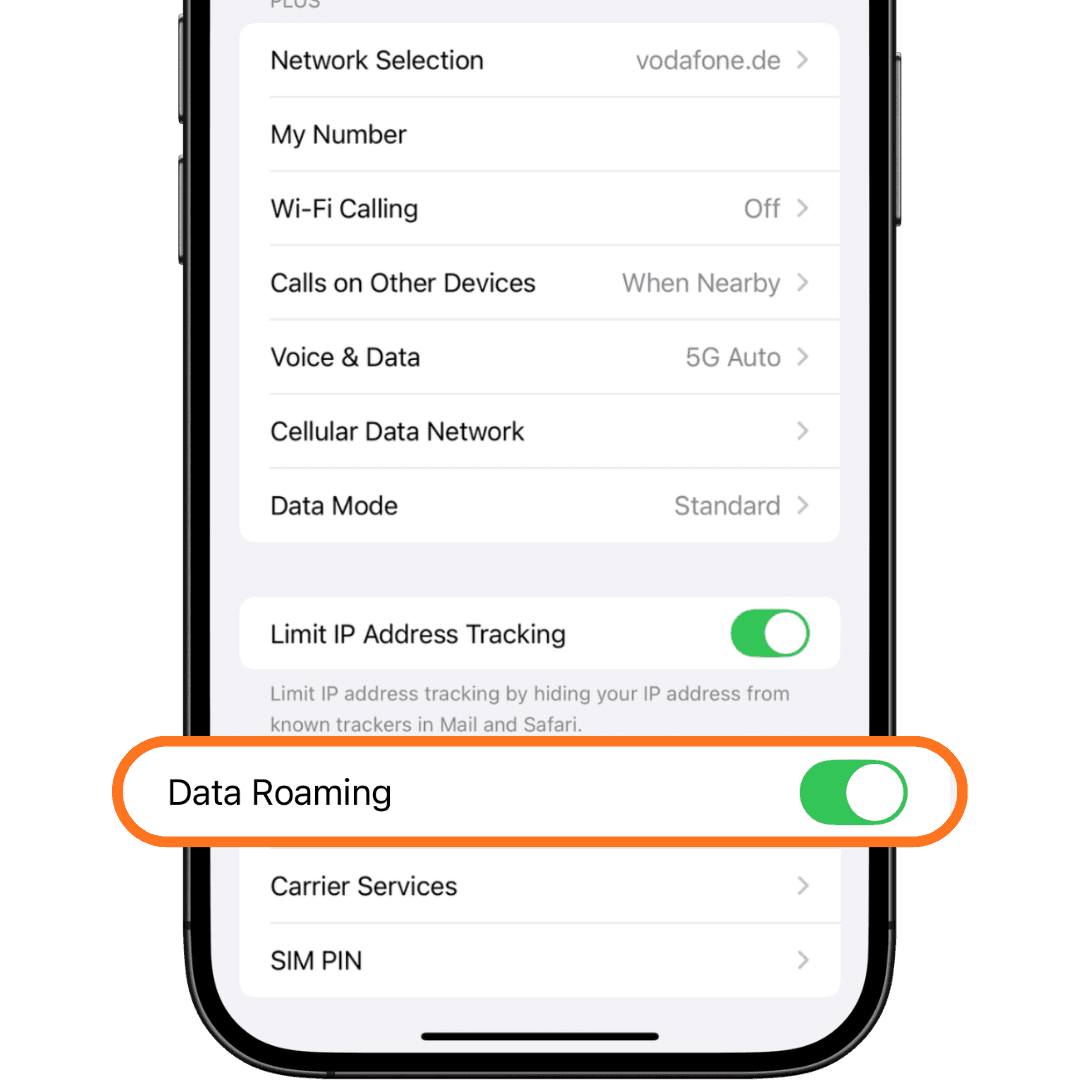
turn on data roaming in Ecuador
Setup takes just 2 minutes: iPhone Settings → Cellular → Add eSIM, Android Network & internet → SIMs. Your plan’s validity starts on first use, not at purchase.
Is your device eSIM‑ready? Check compatibility
Settings.Cellular → Add eSIM → Use QR Code.Enter Details Manually and paste the SM‑DP+ address and activation code.Turn On This Line and enable Data Roaming.Settings.Network & internet → SIMs (Samsung: Connections → SIM manager) and tap Add eSIM.Scan QR code and scan the code from your eSIMFOX email — or enter the activation details manually.mobile data SIM and enable data roaming for it.Exact menu names may vary slightly by phone model and Android version. For a full step‑by‑step guide by device, see our eSIM activation guide.
Start with your trip length and daily habits. Get a useful estimate and a package that covers it.
Your data budget
 Ecuador
≈ 5 GB
For 7 days of travel
Includes a 20% reserve
Starting point: about 0.5 GB per day, rounded up to the next GB. Estimate for one device.
Directions, bookings and text messages use little data. Photos and video calls change that.
Spotify: about 40–150 MB per hour at normal to very high quality, excluding lossless audio.
Netflix: up to 3 GB per hour in HD. Video quality makes a big difference.
All figures are estimates. Actual usage depends on your device, app settings and habits. Apps are examples of usage, not a guarantee of availability in every country.
Discover the advantages of eSIMFOX for your next trip.
Scroll to compare providers
 eSIMFOX eSIMFOX |  Airalo Airalo |  Holafly Holafly |  Saily Saily |  Nomad Nomad |  Ubigi Ubigi |
|---|---|---|---|---|---|
| €3.20/GB5 GB · 30 days · €15.99 | €5.19/GB≈ 1.6× this per-GB rate | €8.90/day | €4.63/GB≈ 1.4× this per-GB rate | €2.96/GB≈ 0.9× this per-GB rate | €5.86/GB≈ 1.8× this per-GB rate |
Competitor reference prices are dated July 2026. Their bundle sizes and validity are not specified. eSIMFOX shows its current lowest fixed-plan price per GB; the plan is linked in the eSIMFOX column. Multiples compare the displayed rates, with different observation dates. Unlimited daily prices are separate.
Roaming charges can add up quickly. Get a prepaid data plan for Ecuador & stay in control of your phone bill.
Activate your eSIM before your flight — your data will be ready to use when you land.
Choose from several affordable data plans for Ecuador. Get as much or as little data as you need.
Add new destinations to your existing eSIM through the eSIMFOX dashboard — no new eSIMs needed.
Both get you online – here's how they differ for your trip.
| Criterion | eSIMFOX eSIM Recommended | Local SIM card in Ecuador |
|---|---|---|
| Available from | Before you leave – QR code instantly by email | Only on arrival – at the airport or a shop |
| Setup | Scan the QR code, active in 2 minutes | Queue up, often with ID registration |
| Your home number | Stays active (Dual-SIM) – reachable for SMS | SIM swap needed – number offline |
| Cost | Fixed package price, no roaming fees | Variable, sometimes a tourist markup |
| Top up | Anytime in your dashboard, no new SIM | Only on-site in a shop or app |
| Ideal for | Travelers with an eSIM-capable phone | Phones without eSIM or very long stays |
For most travelers the eSIM is the faster and cheaper choice – with no waiting at the airport.
Scroll the table sideways to see all columns.
Find answers to common questions about eSIM activation, compatibility, top-ups, and more.
The best eSIM for Ecuador pairs the most reliable local networks with flexible plans. eSIMFOX connects you to the Movistar and Claro networks, with plans from 1 GB to 50 GB, activation in 2 minutes and a fixed price from €3.99.

 Belgium
 Germany
 Türkiye
 USA
USA Portugal
 Belgium
 PayPal
 Apple Pay
 Credit or debit card Belgium Ready to Use
The data plan will be activated automatically when you arrive at your destination.
The data plan will be activated automatically when you arrive at your destination.
Tap Install and follow the prompts to add the eSIM to your device.
Pick a country, choose a bundle, pay, and install — your eSIM is ready before you land. All from one app, on iPhone or Android.
200+ countries, regional and global plans in one store.
Transparent per-GB pricing — no surprises, no roaming fees.
Secure checkout, then a guided one-tap eSIM install.


Heading somewhere else after Ecuador? One eSIMFOX profile works for every destination — just add a new plan.
More tips for your trip. Open the topic you want to read.
Planning your journey to Ecuador? A reliable data connection is essential for navigating this diverse country, from the Amazon rainforest to the Galapagos Islands. The best eSIM for travel to Ecuador offers strong 4G coverage in major cities like Quito and Guayaquil, with growing 5G availability. When selecting your eSIM, prioritize providers that offer excellent coverage through Ecuador's top mobile networks. Most quality eSIMs include hotspot capabilities, allowing you to share your connection with other devices. With eSIMFOX, you receive a single eSIM that works across multiple countries. For example, when you purchase an eSIM for Ecuador, you can easily add data packages for other destinations like Turkey, USA, or Spain on the same eSIM later. This flexibility makes it perfect for travelers exploring multiple South American countries. Consider your itinerary and data needs to choose between 7-day or 30-day plans for your Ecuadorian adventure.
Looking to buy a prepaid eSIM for Ecuador? Skip the hassle of finding a local SIM card upon arrival and get connected instantly. Prepaid eSIM plans for Ecuador offer excellent value with various data allowances to match your travel needs. Prices typically range from $10-30 depending on your data requirements and trip duration. Most providers deliver your eSIM profile digitally within minutes of purchase – simply scan a QR code, and you're ready to connect to Ecuador's reliable 4G networks. These prepaid plans eliminate surprise roaming charges while giving you the freedom to tether your connection to other devices. Whether you're visiting the colonial streets of Cuenca or exploring the Andean highlands, having a prepaid data plan ensures you stay connected without hunting for WiFi spots. Check compatibility with your device before purchasing to ensure a smooth experience throughout your Ecuadorian journey.
Yes, eSIM technology works excellently in Ecuador, with strong network coverage across major cities and tourist destinations. To use an eSIM in Ecuador, you'll need a compatible device – most recent iPhone models (XR and newer), Google Pixel (3 and newer), Samsung Galaxy (S20 and newer), and many other modern smartphones support eSIM technology. Before traveling, verify your phone's eSIM compatibility in your device settings. Ecuador's main mobile networks fully support eSIM technology, providing reliable 4G coverage throughout populated areas and along major transportation routes. With eSIMFOX, you receive a single eSIM that works across multiple countries. When you purchase an eSIM for Ecuador, you can easily add data packages for other destinations like Turkey, USA, or Spain on the same eSIM later. This makes managing your connectivity simple if you're visiting multiple countries. Connection speeds are typically sufficient for video calls, navigation, and streaming, with hotspot functionality available for sharing your connection with other devices.
Visiting Ecuador's stunning landscapes from the Pacific coast to the Amazon basin? A tourist eSIM card for Ecuador provides the perfect connectivity solution. Unlike physical SIM cards, these digital profiles activate instantly, giving you immediate access to data upon landing at Mariscal Sucre International Airport in Quito. Most tourist eSIMs connect to Claro or Movistar networks, offering reliable coverage throughout Ecuador's diverse regions. 7-day plans are ideal for short visits, while 30-day options better suit extended explorations. Tourist-oriented eSIMs typically include generous data allowances with 4G speeds and hotspot capabilities, allowing you to share your connection with travel companions. Prices remain competitive compared to international roaming, with most plans offering several GB of high-speed data. For travelers concerned about staying connected in remote areas, look for eSIMs that provide access to multiple local networks for the best possible coverage as you journey through Ecuador's varied terrain.
Setting up an eSIM Ecuador for your iPhone is remarkably straightforward. Compatible with iPhone XR, XS, and all newer models, the process takes just minutes. Navigate to Settings > Cellular > Add Cellular Plan and scan the QR code provided by your eSIM supplier. For travelers with newer iPhones (12 and above), you'll benefit from dual SIM functionality, allowing you to keep your home number active while using your Ecuador data plan. This setup is perfect for receiving verification codes or important calls while abroad. When choosing an eSIM provider for your iPhone in Ecuador, look for plans that offer good coverage through partners like Claro or Movistar, ensuring connectivity in both urban centers and popular tourist destinations. Data plans ranging from 1GB to 10GB are available, with validity periods matching common travel durations. The iPhone's built-in data management tools help you monitor usage, ensuring you don't exceed your plan's limits during your Ecuadorian adventure. Secure your eSIM before departure to ensure immediate connectivity when you arrive.
Planning a longer exploration of Ecuador? A 30 days eSIM plan Ecuador is your ideal connectivity solution. These month-long plans are perfect for digital nomads working remotely from Quito's coffee shops, volunteers staying in rural communities, or travelers taking their time to explore the country's diverse regions from the Galapagos to the Amazon. Most 30-day plans offer substantial data allowances of 5-20GB, sufficient for regular navigation, social media use, video calls, and occasional streaming. The extended validity eliminates the hassle of frequent renewals, allowing you to focus on your Ecuadorian experience. These plans typically provide access to Ecuador's robust 4G networks, with hotspot functionality included for connecting multiple devices. When selecting a 30-day plan, consider your anticipated data usage patterns and travel itinerary – some remote areas may have varying coverage strength. Many providers offer the flexibility to top up if needed, ensuring you remain connected throughout your extended stay in this beautiful South American country.